
SalesPath
Find quotes, clients, vendors, products and commissions in SalesPath, and draft quotes, add and edit clients and record commission reports, as the signed-in user.
 View in the Claude registry
- Brand
- SalesPath
- Category
- Sales & CRM
- Primary Subcategory
- B2B Sales CRM Platforms
Integration details
Description
SalesPath is quoting software for salespeople. This connector lets Claude work with one SalesPath organization at a time, as the signed-in user, from a conversation. Read: find and open quotes with their line items, cost and margin; look up clients, client notes and vendors; search the product catalog; see unit-price history; rank top clients, vendors, products and quotes by quoted or won dollars; and review commissions owed and paid. Write: create draft quotes and change their line items, notes and details; create clients (up to 25 per call), change them and add notes; add new products to the catalog under an existing vendor (up to 25 per call); create and edit commission reports; and, for owners and admins, change a catalog product's base cost after a preview you confirm in chat and edit teammates' drafts. Quote edits apply to drafts only. Nothing reaches your client until you send the quote yourself from SalesPath, where you can review it first. If you allow it when you connect, Claude can also mark your quotes sent, won, lost or paid and mark commission reports paid or unpaid. Quote status changes are previewed first. Marking something sent or paid only records that status in SalesPath. Nothing is emailed to your client and no money moves. Limits: it cannot send, email or delete a quote, delete or merge clients, or archive a product or add a vendor. It can remove lines from your own draft quote, and the connector cannot restore them. Marking a quote sent, won or lost, or an invoice paid, cannot be undone through the connector. Setup: you need a SalesPath account. You sign in to SalesPath, choose an organization, and approve what Claude may do, including whether status changes are allowed. You can revoke the connection under Settings, then AI assistants, in the SalesPath web app. Stored notes and descriptions are treated as customer data, not instructions.
- Integration type
- Connector
- Verification status
 Community connector
- Platform
- Claude
- Primary Subcategory
- B2B Sales CRM Platforms
- Secondary Subcategories
- None listed
- Brand
- SalesPath
- Access
- Account required
- First tracked
- 2026-11-25
- Tool count
- 34
- Market
- US
The Primary Subcategory used for this profile’s headline score.
Other Subcategories where the Integration is listed.
 AgentDiscoClaude Discoverability Score
Claude Connector discovery is coming soon
Community Connectors only appear in Claude’s registry.Once verified, organic discovery begins and we can calculate your score.Read more about Community Connector verification.
No spam. Unsubscribe any time.
What discovery looks like
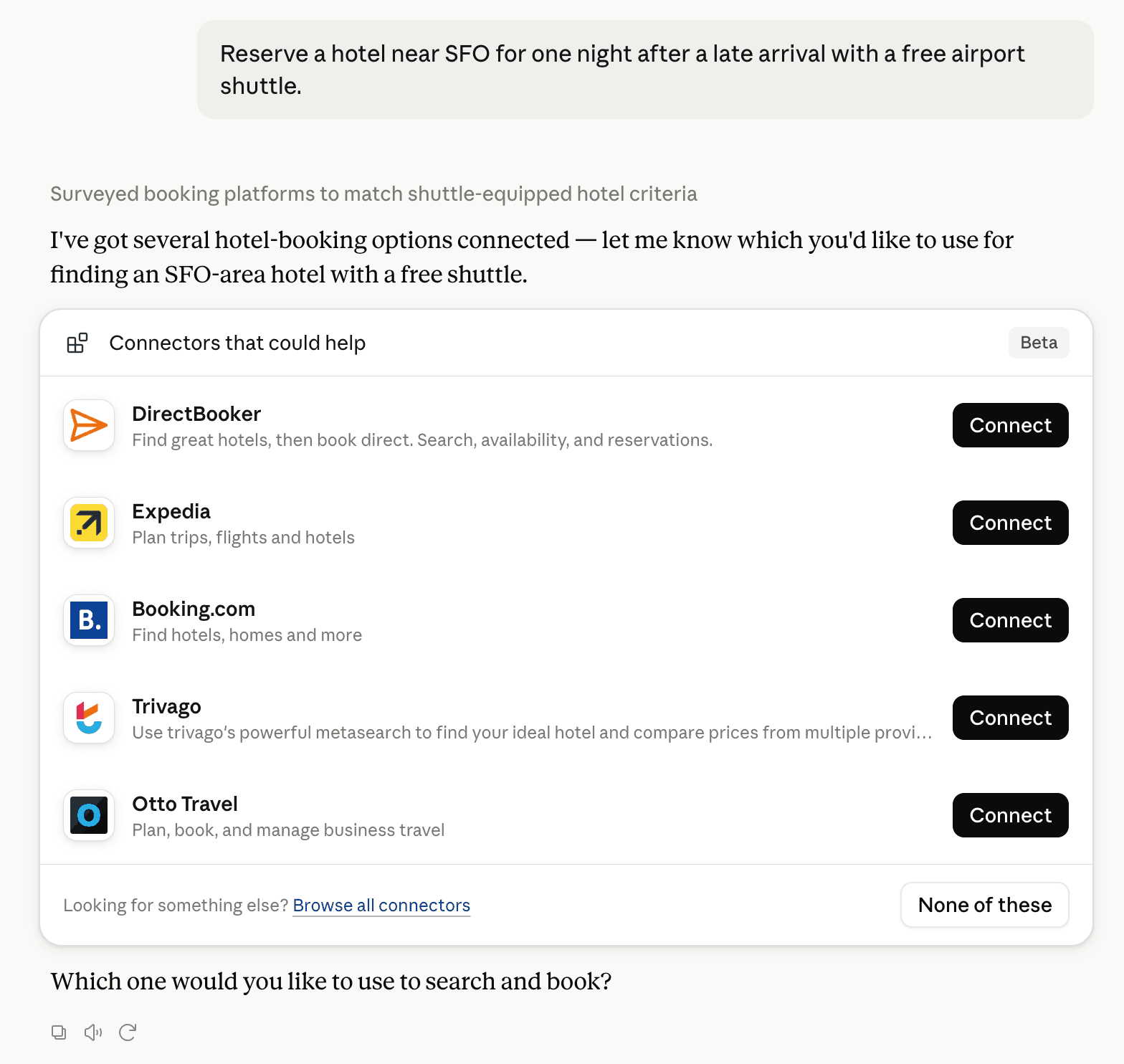
Claude can surface verified Connectors when they match a user’s Prompt.
How Claude Connector discovery works
Your Connector will compete to appear for users’ Prompts once Claude verifies it
Competing in Claude B2B Sales CRM Platforms
View Category
34 tools agents can invoke

SalesPath Claude Connector FAQ
How the directory, categories and Discoverability Score work.
Read the methodologyHow do I improve SalesPath's Claude Connector discoverability?
The levers are the listing surface agents actually read: names, descriptions, keywords, tool metadata, and registry health. Which lever matters depends on where discovery breaks, which is what continuous measurement shows.
What are SalesPath alternatives on Claude?
As of 2026-11-26, SalesPath competes with Zoho CRM, Zoho CRM, Nutshell CRM, Salesflare, Salesforce - Beta, Pipedrive, Salesloft, HubSpot and 177 more in Claude B2B Sales CRM Platforms, ranked by public Discoverability Score.
Where is this profile measured?
This profile uses the geography attached to the latest public registry snapshot: US. Locale tags are intentionally omitted.